The Problem
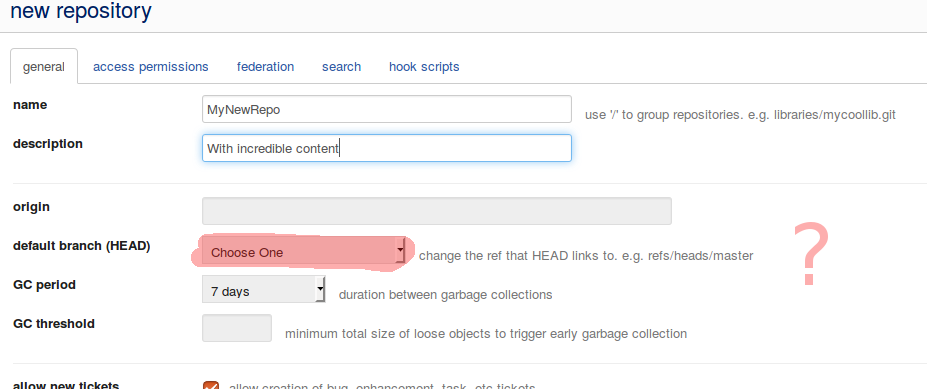
If you create a new repository in gitblit then you are not able to choose the master branch. Therefore you cannot check out anything.
The Solution
The answer to this behaviour is simple: You can not select a default branch because there is no default branch. The solution is …
- Create the repositpry in gitblit (without choosing a default branch)
- Create a local repository
- Connect the repositories by telling the local repo where his remote friend is
- Push the local master to the remote repo
For all of you who prefer to see the pure commands - here they are:
Make a new directory and initialize it as git repository
gue@gue-thinkpad:~/test$ mkdir MyNewRepo
gue@gue-thinkpad:~/test$ cd MyNewRepo/
gue@gue-thinkpad:~/test/MyNewRepo$ git init
Initialized empty Git repository in /home/gue/test/MyNewRepo/.git/
Now you can add your source code files or whatever.
Commit against your local repository
gue@gue-thinkpad:~/test/MyNewRepo$ git add -A
gue@gue-thinkpad:~/test/MyNewRepo$ git status

Initial commit

Changes to be committed:
  (use "git rm --cached <file>..." to unstage)

 new file:   build.sh
 new file:   content/client-server.png
 new file:   templates/postfix.md
 new file:   templates/prefix.md
.
.
.

gue@gue-thinkpad:~/test/MyNewRepo$ git commit -m "First version"
[master (root-commit) b962064] First version
 29 files changed, 791 insertions(+)
 create mode 100755 build.sh
 create mode 100644 content/client-server.png
 create mode 100644 templates/postfix.md
 create mode 100644 templates/prefix.md
.
.
.
Use this repository as any other.
Connect the remote gitblit repo and push the changes
$git remote add origin https://username@gitblit.host.com/r/MyNewRepo.git

$ git push origin master
Password for 'https://username@gitblit.host.com':
Counting objects: 40, done.
Delta compression using up to 4 threads.
Compressing objects: 100% (35/35), done.
Writing objects: 100% (40/40), 531.11 KiB | 0 bytes/s, done.
Total 40 (delta 2), reused 0 (delta 0)
remote: Resolving deltas: 100% (2/2)
remote: Updating references: 100% (1/1)
To https://username@gitblit.host.com/r/MyNewRepo.git
 * [new branch]      master -> master
From now on all changes are saved in your gitblit repo.
Depending on your setup of gitblit the URLs and authentication may look different from this example.