The Problem
One of my customers is running a 24/7 server with a mdadm based software raid that mirrors all operations between two disks (a so called RAID 1 configuration). Unfortunately one of the disks started to fail.
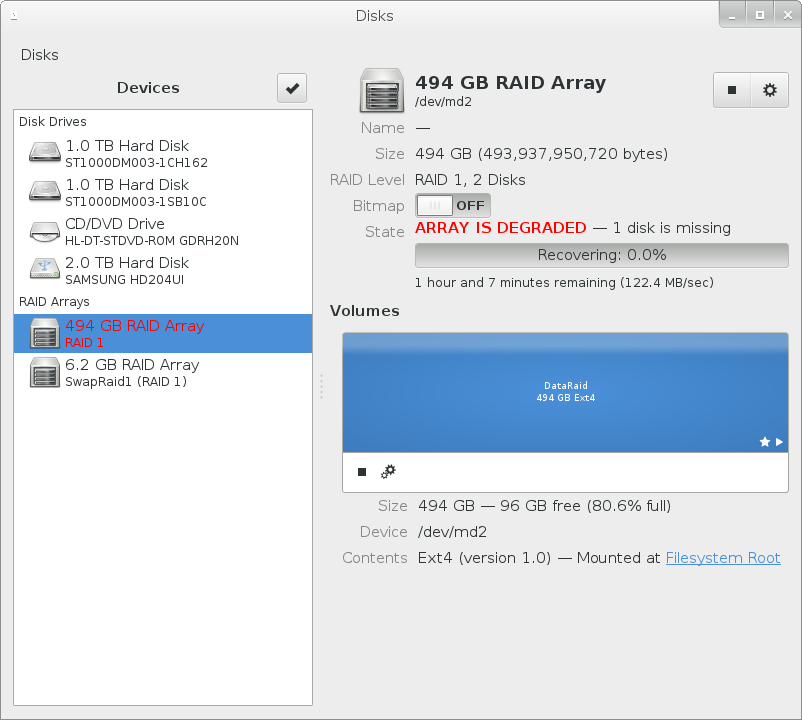
While the system was still running on the other (still working) disk I needed to replace the failing disk with a new one. Here is how you do it under Ubuntu and mdadm.
The Solution
The first step was to buy another (new) disk. So i went to the retail store around the corner to buy another disk which has at least the size of the old (failed) one. The old one (/dev/sda/) had a partitionlayout like this:
root@primergy:/home/logtadmin# sfdisk -d /dev/sda
Warning: extended partition does not start at a cylinder boundary.
DOS and Linux will interpret the contents differently.
# partition table of /dev/sda
unit: sectors

/dev/sda1 : start=     2048, size=964722688, Id=fd, bootable
/dev/sda2 : start=964726782, size= 12044290, Id= 5
/dev/sda3 : start=        0, size=        0, Id= 0
/dev/sda4 : start=        0, size=        0, Id= 0
/dev/sda5 : start=964735380, size= 12032685, Id=fd
Even if it was not necessary I decided to by a disk with the same storage capacity as the other one in the raid array - a 1TB Disk for about 70 Euros.
The disks within a raid array do not necessarily have to have all the same size / dimensions. The overall size of the array is limited by the smallest disk in the array.
I replaced the old failed disk with he new one - which showed up as /dev/sdb
root@primergy:/home/logtadmin# sfdisk -d /dev/sdb

sfdisk: ERROR: sector 0 does not have an msdos signature
 /dev/sdb: unrecognized partition table type
No partitions found
The next step was to partition the new disk. Since I wanted to replicate the old partition layout i decided to copy it from the still working disk:
root@primergy:/home/logtadmin# sfdisk -d /dev/sda | sfdisk /dev/sdb
Warning: extended partition does not start at a cylinder boundary.
DOS and Linux will interpret the contents differently.
Checking that no-one is using this disk right now ...
OK

Disk /dev/sdb: 121601 cylinders, 255 heads, 63 sectors/track

sfdisk: ERROR: sector 0 does not have an msdos signature
 /dev/sdb: unrecognized partition table type
Old situation:
No partitions found
New situation:
Units = sectors of 512 bytes, counting from 0

   Device Boot    Start       End   #sectors  Id  System
/dev/sdb1   *      2048 964724735  964722688  fd  Linux raid autodetect
/dev/sdb2     964726782 976771071   12044290   5  Extended
/dev/sdb3             0         -          0   0  Empty
/dev/sdb4             0         -          0   0  Empty
/dev/sdb5     964735380 976768064   12032685  fd  Linux raid autodetect
Warning: partition 1 does not end at a cylinder boundary
Warning: partition 2 does not start at a cylinder boundary
Warning: partition 2 does not end at a cylinder boundary
Successfully wrote the new partition table

Re-reading the partition table ...

If you created or changed a DOS partition, /dev/foo7, say, then use dd(1)
to zero the first 512 bytes:  dd if=/dev/zero of=/dev/foo7 bs=512 count=1
(See fdisk(8).)
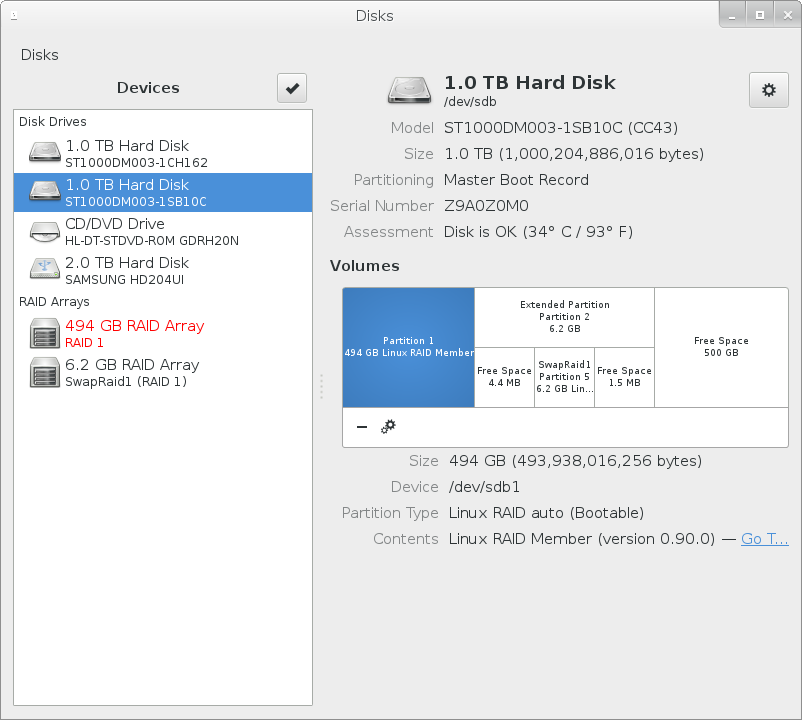
The ‘Disks’ tool showed that the partition layout was really copied from the remaining disk to the new one:
Fine. The last step was to reattach the new partitions to the raid array:
root@primergy:/home/logtadmin# mdadm -v --manage /dev/md127 -f --add /dev/sdb5
mdadm: added /dev/sdb5
root@primergy:/home/logtadmin# mdadm -v --manage /dev/md2 -f --add /dev/sdb1
mdadm: added /dev/sdb1
OK - now the rebuild process started to work - which was also confirmed by the content of the /proc/mdstst file.
root@primergy:/home/logtadmin# cat /proc/mdstat
Personalities : [raid1] [linear] [multipath] [raid0] [raid6] [raid5] [raid4] [raid10]
md127 : active raid1 sdb5[3] sda5[2]
      6012224 blocks super 1.2 [2/1] [U_]
      [================>....]  recovery = 83.5% (5025408/6012224) finish=0.1min speed=105808K/sec

md2 : active raid1 sdb1[2] sda1[0]
      482361280 blocks [2/1] [U_]
       resync=DELAYED

unused devices: <none>
Finally i had to ensure that the GRUB bootloader is aware of the new disks. So i had to populate it to booth disks:
root@primergy:~# grub-mkdevicemap -n
root@primergy:~# grub-mkdevicemap -ngrub-install /dev/sda
root@primergy:~# grub-mkdevicemap -ngrub-install /dev/sdb
root@primergy:~# update-grub
Thats it.