The Problem
My wireless network adapter dropped the connection from time to time. In order to find out if it is a hardware problem or just a weak signal which is just above the noise floor i decided to investigate in the signal strength and link quality of my adapter.
The Solution
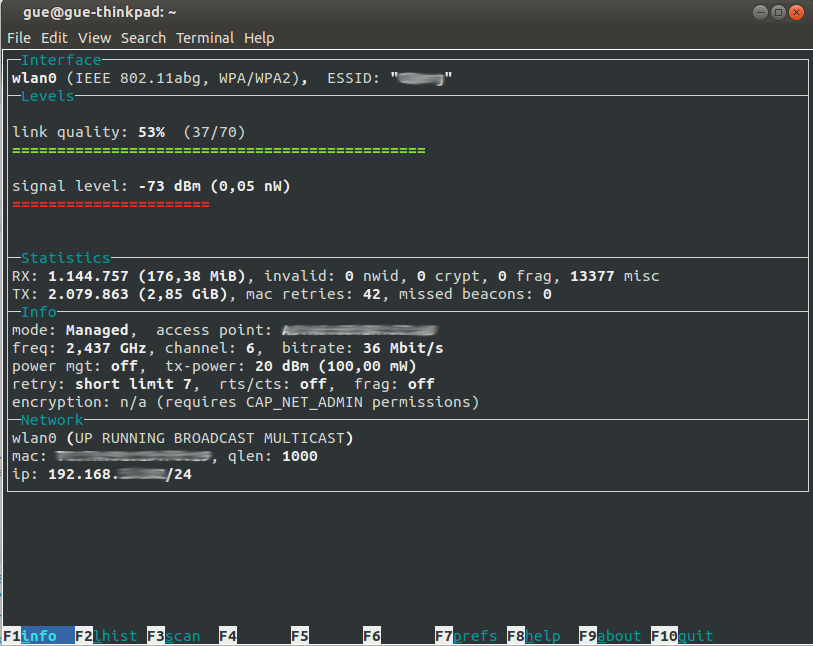
I decided to go with wavemon - a small n-curses based utility which monitors network devices. The installation is straight forward:
$ sudo apt-get install wavemon
Reading package lists... Done
Building dependency tree
Reading state information... Done
The following NEW packages will be installed:
  wavemon
0 upgraded, 1 newly installed, 0 to remove and 0 not upgraded.
Need to get 0 B/50,0 kB of archives.
After this operation, 146 kB of additional disk space will be used.
Selecting previously unselected package wavemon.
(Reading database ... 408136 files and directories currently installed.)
Preparing to unpack .../wavemon_0.7.6-2_amd64.deb ...
Unpacking wavemon (0.7.6-2) ...
Processing triggers for menu (2.1.47ubuntu1) ...
Processing triggers for man-db (2.7.0.2-5) ...
Setting up wavemon (0.7.6-2) ...
Processing triggers for menu (2.1.47ubuntu1) ...
After that you can start the tool and you will end up with a nice screen displaying the signal strength, the link quality and many other informations: