The Problem
I ordered for a parking sensor project some TTGO v2 Boards. Since I am a big fan of the LuaRTOS project i had to port it to this Hardware architecture.
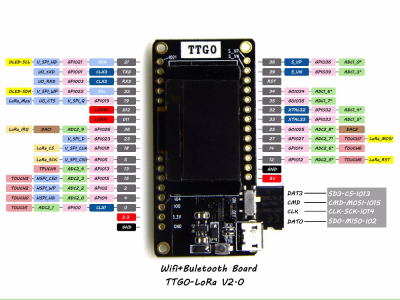
The schematic:
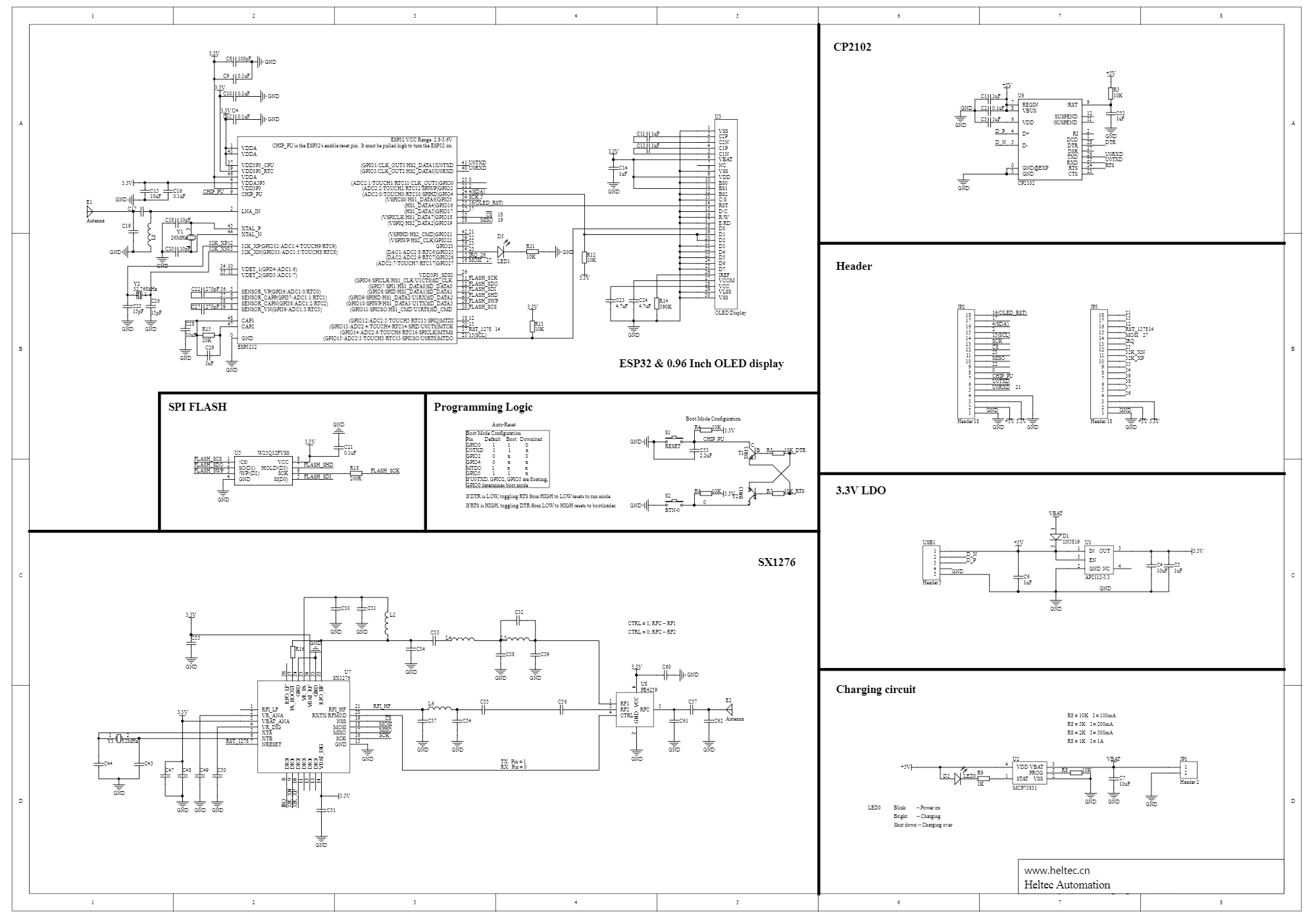
For all of you who do not want to build your own firmware: Here is a precompiled version with all the features from below. Just extract it to a folder and flash it with the esptool.py
python /home/user/LORA/esp-idf/components/esptool_py/esptool/esptool.py --chip esp32 --port /dev/ttyUSB0 --baud 921600 --before default_reset --after hard_reset write_flash -z --flash_mode dio --flash_freq 40m --flash_size detect 0x1000 /home/user/LORA/Lua-RTOS-ESP32/build/bootloader/bootloader.bin 0x90000 /home/user/LORA/Lua-RTOS-ESP32/build/lua_rtos.bin 0x8000 /home/user/LORA/Lua-RTOS-ESP32/build/partitions.bin
The Solution
With the given information from above, and some spare time I started to play with the components which are mounted on the board.
Graphics Display
The display is a 128x64px OLED which is connected via I2C to the ESP32.
Component config > Lua RTOS > Hardware > I2C pin map: (22) I2C0 SCL
Component config > Lua RTOS > Hardware > I2C pin map: (21) I2C0 SDA
The lua sample code looks like this:
gdisplay.attach(gdisplay.SSD1306_128_64, gdisplay.LANDSCAPE, false, 0x3c)
-- LET THE DISPLAY INITIALIZE ITSELF --
gdisplay.clear()
--gdisplay.setfont(gdisplay.FONT_COMIC24)
gdisplay.setfont(gdisplay.FONT_UBUNTU16)
gdisplay.write({gdisplay.CENTER,gdisplay.CENTER},"{b}")

-- Get the screen size
dw, dh = gdisplay.getscreensize()

-- Draw a diagonal line, from the first screen's point to
-- the last screen's point
gdisplay.line({0,0}, {dw - 1, dh - 1})
gdisplay.putpixel(2,2)
gdisplay.putpixel(2,3)
gdisplay.putpixel(2,4)
SD Card Adapter
The SD Card adapter works fine. I wanted to use it with the FAT filesystem - so I choose the following settings:
Component config > Lua RTOS > File Systems: SD Card storage (FAT)
Component config > Lua RTOS > Hardware > SD Card: Interface (SPI interface)
Component config > Lua RTOS > Hardware > SD Card: (3) SDCARD SPI port
Component config > Lua RTOS > Hardware > SD Card: (13) SDCARD SPI CS GPIO numberComponent config > Lua RTOS > Hardware > SPI pin map: (13) SPI3 default CS
Component config > Lua RTOS > Hardware > SPI pin map: (2) SPI3 MISO
Component config > Lua RTOS > Hardware > SPI pin map: (15) SPI3 MOSI
Component config > Lua RTOS > Hardware > SPI pin map: (14) SPI3 CLK
The lua sample code looks like this:
fs.mount("sd", "fat")
cd sd
ls
fs.unmount("sd")
LORA Modem
To get the LORA modem up and running set the following configurations:
Component config > Lua RTOS > Hardware > LoRa Wan: LoRa hardware type (sx1276, used in nodes and single-channel gateways)
Component config > Lua RTOS > Hardware > LoRa Wan: ISM band (Europe - 868 Mhz)
Component config > Lua RTOS > Hardware > LoRa Wan: (2) LoRa SPI port
Component config > Lua RTOS > Hardware > LoRa Wan: (18) LoRa SPI CS GPIO number
Component config > Lua RTOS > Hardware > LoRa Wan: (14) LoRa RST GPIO number
Component config > Lua RTOS > Hardware > LoRa Wan: (26) LoRa DIO0 GPIO number
Component config > Lua RTOS > Hardware > LoRa Wan: (33) LoRa DIO1 GPIO number
Component config > Lua RTOS > Hardware > LoRa Wan: (32) LoRa DIO2 GPIO numberComponent config > Lua RTOS > Hardware > SPI pin map: (18) SPI2 default CS
Component config > Lua RTOS > Hardware > SPI pin map: (19) SPI2 MISO
Component config > Lua RTOS > Hardware > SPI pin map: (27) SPI2 MOSI
Component config > Lua RTOS > Hardware > SPI pin map: (5) SPI2 CLK
And the following code allows the device to communicate with the The Things Network
-- Attach the end-device using ISM band 868 Mhz (Europe)
lora.attach(lora.BAND868)
lora.setDevEui("001017CFXXXXXXXX")
lora.setAppEui("70B3D57EXXXXXXXX")
lora.setAppKey("7E6F50891D61AD08CDDDACC7XXXXXXXX")
lora.join()
lora.tx(true,1,"AABBCC")
All components can be used together. That was all I needed.
Happy hacking !