The free VMware Hypervisor is able to attatch NAS drives in order to use it as storage for virtual machines. Lets assume you have a running ESXi 5.5 server and ou want to attatch existing VMs to it that are stored on a NAS that exposes a NFS share.
Step 1: Tell the ESXi that there is an additional Storage
This step is simple. Open the vSphereClient and attatch the exposed NFS share as new datastorage. This works pretty straight forward: Enter the servername, the name of the share and a local identifier.
Step 2: Attatch via vSphere Client
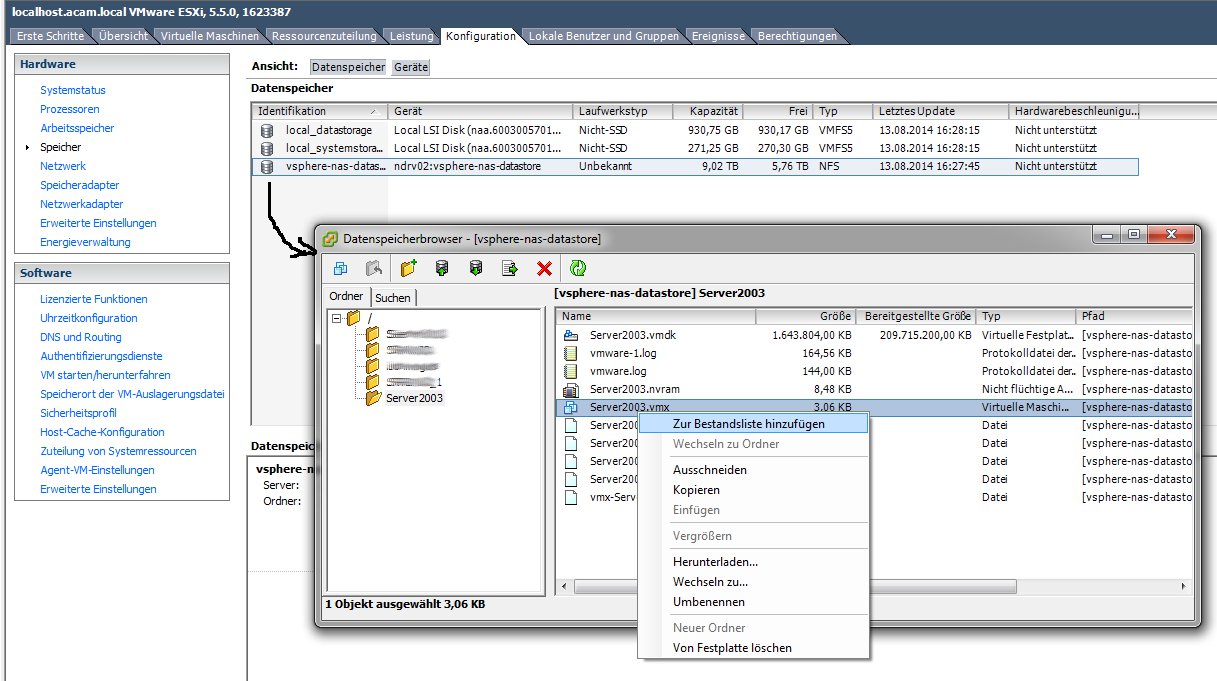
Once the NFS share is attatched you can browse its content by right-cklicking the newly created storage. Browse to the folder that contains the *.vmx file and say “Add to Repository”. Answer the following questions and that’s it.
Step 2: (Alternative) Attatch via SSH
Another way is it to attatch the existing VM via SSH. Ensure that on the Server SSH is enabled (F2 -> Troubleshooting options -> Enable SSH) and login via Putty or another adequate ssh client.
login as: root
Using keyboard-interactive authentication.
Password:
The time and date of this login have been sent to the system logs.

VMware offers supported, powerful system administration tools.  Please
see www.vmware.com/go/sysadmintools for details.

The ESXi Shell can be disabled by an administrative user. See the
vSphere Security documentation for more information.

~ # ls /vmfs/volumes/vsphere-nas-datastore/Server2012/Server2012
Server2012-flat.vmdk  Server2012.vmsd       Server2012.vmxf
Server2012.vmdk       Server2012.vmx

~ # vim-cmd solo/registervm /vmfs/volumes/vsphere-nas-datastore/Server2012/Server2012.vmx
You dont have to do this if you have already added it by the vShpere Client !
Step 3: Start the VM
Whenever you start a reattatched VM the ESXi Server asks you if you have copied the machine or if you have moved it.
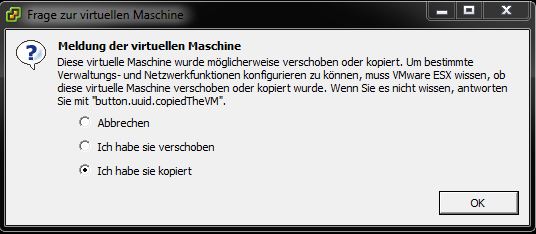
Answer this accordingly and you are finished.
This information is based on the KB Article of VMWare: Registering or adding a virtual machine to the inventory on vCenter Server or on an ESX/ESXi host