The Problem
From time to time you want a user to pick a few files out of a directory (e.g. because you want to process them afterwards). The first approach might be to force the user to enter the filenames which should be processed - but this is (a) unhandy and (b) it does not scale very well.
The Solution
A lot of Linux distributions know a tool called dialog. It enables the user to create simple commandline dialogs within shellscripts.
If you want your users to be able to pick a few files out of a directory you approach could be this:
#!/bin/bash

directory="/var/log"
options=$(find $directory -mindepth 1 -maxdepth 1 -type f -not -name '.*' -printf "%f %TY-%Tm-%Td off\n");
selected_files=$(dialog --checklist "Pick files out of $directory" 60 70 25 $options --output-fd 1);

for f in $selected_files
do
 echo "User selected $f"
done
The script is straight forward: First you define a directory which contains the files, then you search for the files and transform the result into something useable for dialog. Finally you call dialog and collect the selected files.
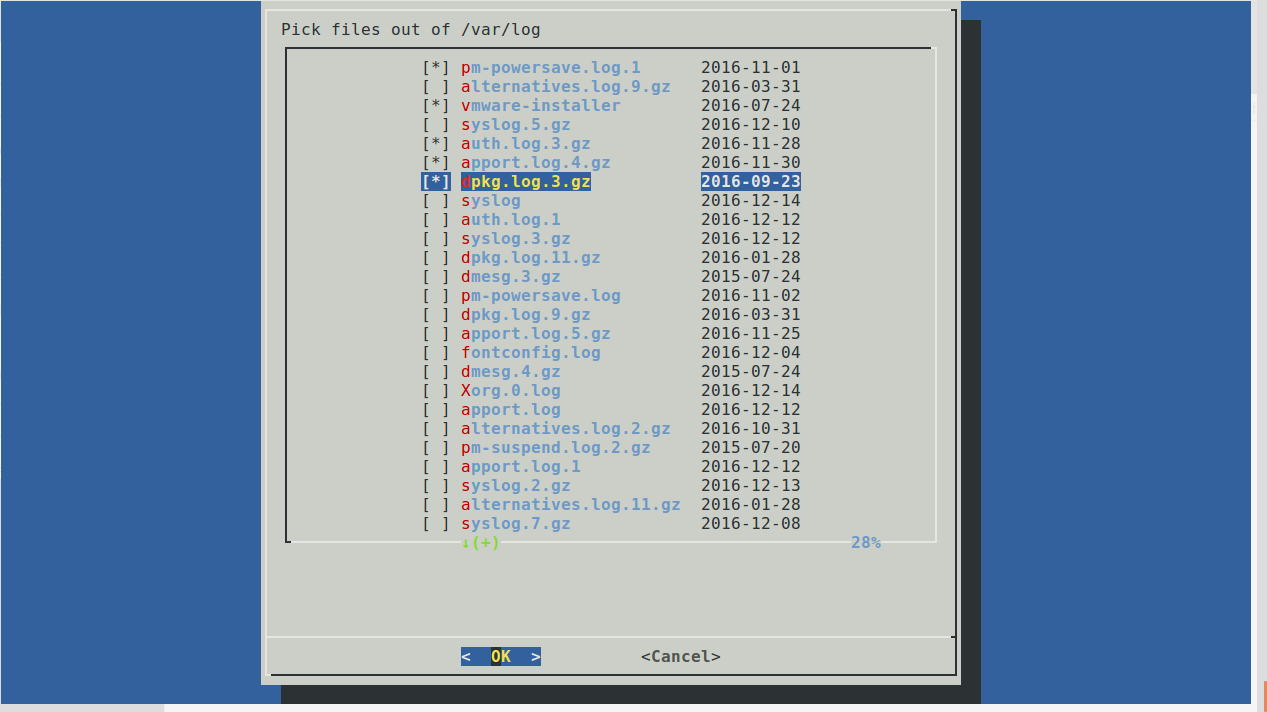
Thats it !